Filter, reconcile, and export TimeLodge results without confusing tracked value, invoiced value, or recorded payments.
Before you begin
- Track time with billable choices and rate snapshots.
- Approve work before expecting it in Profitability or Unbilled work.
- Issue an invoice and record a payment before expecting invoiced or paid amounts.
- Check the workspace time zone and currency. Report From and To dates are inclusive workspace calendar dates.
Roles and permissions
An Owner, Admin, Project Manager, or Finance Admin can open Reports and export the records they may view. A Project Manager sees only assigned projects. An ordinary Member cannot open reports.
Only an Owner or Admin has the private-cost-rate permission, so only those roles see cost, profit, and margin. Those private columns are also omitted from their exports for every other role. A Project Manager can open the budget for an assigned project but cannot see private costs or edit the budget. A Finance Admin can use financial reports but cannot open project management pages.
For Activity history, an Owner or Admin sees operational, financial, private-cost, and security events. A Project Manager sees operational events only; a Finance Admin sees operational and financial events. Members cannot open the history.
Read the amount boundaries first
| View | Date basis and filters | What its totals mean | Missing rates and currency | Export result |
|---|---|---|---|---|
| Time & utilisation | Time-entry Date. The default range is the current workspace month through the current workspace day. Filters include client, project, task, person, Team / role, member status, billability, approval state, and grouping. | All matching tracked time, including running and unsubmitted work. Billable amount is billable hours × each saved bill-rate snapshot. Utilisation is billable hours ÷ configured weekly capacity for the inclusive range; leave is not deducted. Margin is billable amount minus recorded cost. Payment activity is separate and does not change time totals. | Unknown cost is omitted, counted, and makes Margin unavailable rather than confirmed. This view has one workspace-currency Amount column and performs no foreign-exchange conversion; do not interpret a mixed-project selection as converted money. Use a single-currency project filter or a currency-separated view below. | Export CSV contains the filtered entry rows, state, hours, billable amount, currency, and a totals row. Private cost is included only with permission. |
| Profitability | Approved or invoiced time-entry dates and expense dates. It defaults to the same workspace-local month-to-date range. Filter by the commercial dimensions and Missing cost. | Recognised billable value is tracked billable value. Invoice value (revenue) is this report's revenue basis, not issued invoice totals or payments. Labour and expense cost produce gross profit and margin. Fixed-fee revenue is allocated by recognised billable effort; non-billable projects produce no revenue. | Exclude and flag leaves a missing cost out, flags it, and keeps profit and margin unknown instead of treating it as zero. Mixed currencies are separated and never summed or converted. | Export CSV contains contributing records plus a summary for each currency. Private cost, profit, and margin columns are omitted without permission. |
| Unbilled work | Approved source date, optional inclusive From/To, and age as of the displayed workspace timestamp. Filter by client, project, task, person, age, billable type, currency, and grouping. | Only eligible approved time, expenses, and remaining fixed-fee value. A draft invoice claims a source; claimed or issued sources leave the eligible total until released. Fixed-fee hours are traceability only and never set the fee. | A billable time source without a bill-rate snapshot is ineligible and explains why; private cost is not part of this view. Totals are separated by currency with no conversion, and one invoice selection cannot mix clients or currencies. | CSV and XLSX contain the same filtered sources, eligibility reason, dates/age, snapshots, amounts, policies, and per-currency totals. |
| Project Budget | All completed project work, or the selected recurring budget period. Project dates do not hide work outside those dates; a warning identifies it. Forecasts use recent recorded work and are estimates. | Hours and fee usage, mutually exclusive Pending/Approved/Invoiced buckets, source-linked invoices and payments, recognised and unbilled values, outstanding balance, and commercial profit. Gross profit here is attributed invoiced amount minus recognised cost, so it can differ from Profitability's operational revenue basis. | Missing bill rates contribute no recognised value; missing cost can understate cost and margin. Warnings identify both. Amounts are separated by source currency; the configured budget remains in project currency. | There is no project-budget download. Use the matching report export for record-level data or Export workspace for the complete workspace archive. |
| Activity history | Event When timestamp, not the underlying work or invoice date. From, To, Actor, Action, and Target filter events; role visibility is applied first. | An append-only sequence of who changed what. Opening an event shows immutable IDs and safe context; it does not recalculate report totals. | Costs and currencies are not totalled. A financial event may show its stored currency or amount context only when the viewer can see that category. | There is no activity-page download. The full Export workspace includes retained audit events. |
Review time, billability, and the team view
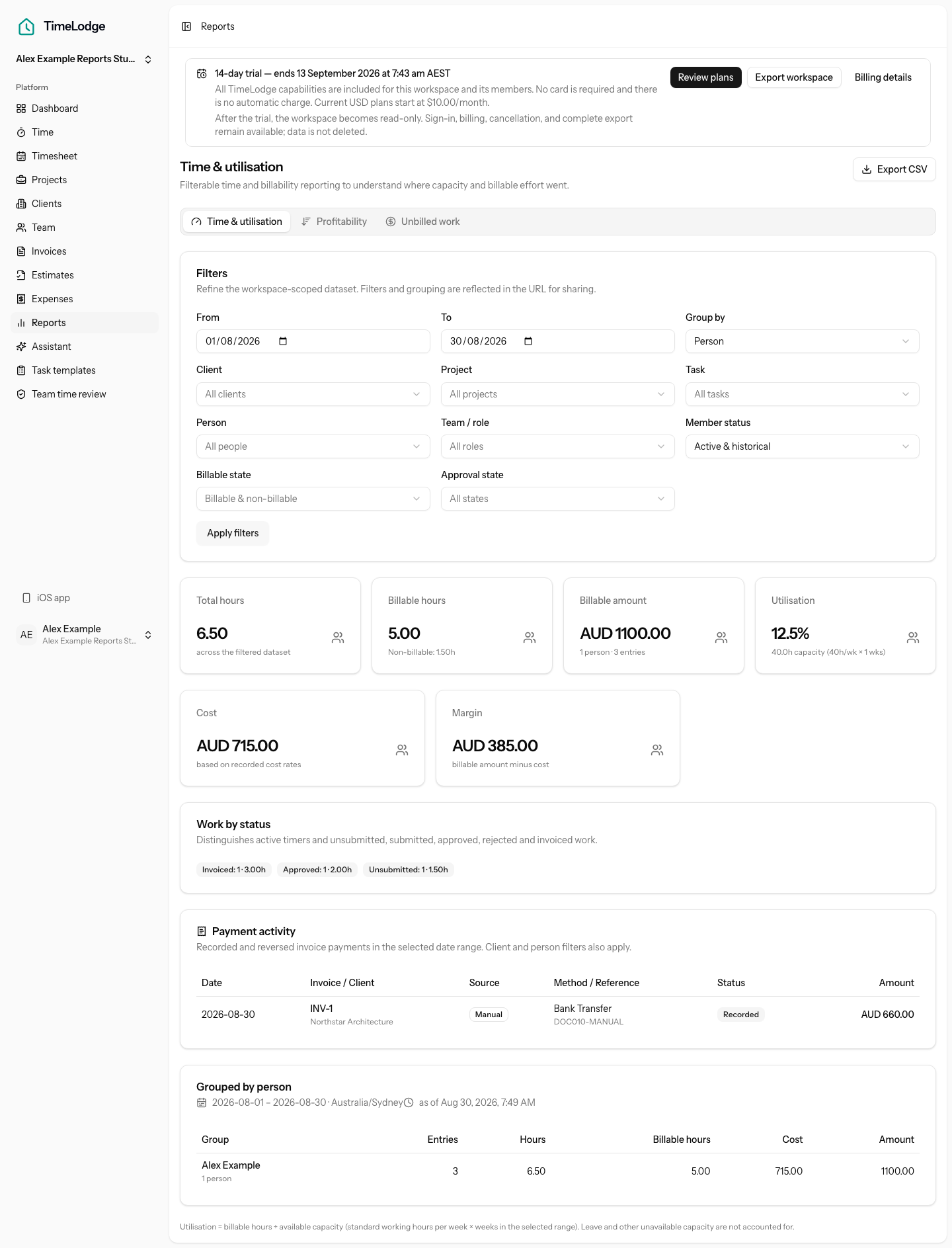
- Open Reports and select Time & utilisation.
- Set inclusive From and To dates.
- Choose any client, project, task, person, Team / role, member status, Billable state, or Approval state filters you need.
- Choose Group by. Select Team / role to compare Owner, Admin, Project Manager, Finance Admin, and Member snapshots captured when the time was recorded.
- Select Apply filters.
- Compare Total hours, Billable hours, Billable amount, Utilisation, and—when permitted—Cost and Margin.
- Reconcile Work by status, Payment activity, and the grouped rows. These sections share the date range but answer different questions.
- Select Export CSV and open the file to confirm its rows and totals match the visible selection.

Expected result: the verified sample shows 6.50 total hours, 5.00 billable, 1.50 non-billable, A$1,100 billable amount, A$715 cost, A$385 margin, and one recorded A$660 payment. Grouping by Team / role shows one Owner and the same three entries.
Interpret profitability

- Select Profitability under Reports.
- Set the date and commercial filters, leave Missing cost at Exclude and flag, then select Apply filters.
- Read each currency section separately.
- Compare Recognised billable value and Invoice value (revenue) with labour and expense cost.
- Select Export CSV and confirm the detail rows and per-currency summary match the screen.
Expected result: the sample's two approved-or-invoiced billable records produce A$1,100 recognised value, A$1,100 report revenue, A$550 labour cost, A$550 gross profit, and 50% gross margin. The separately recorded A$660 payment does not change these operational profitability figures.
Find and drill into unbilled work
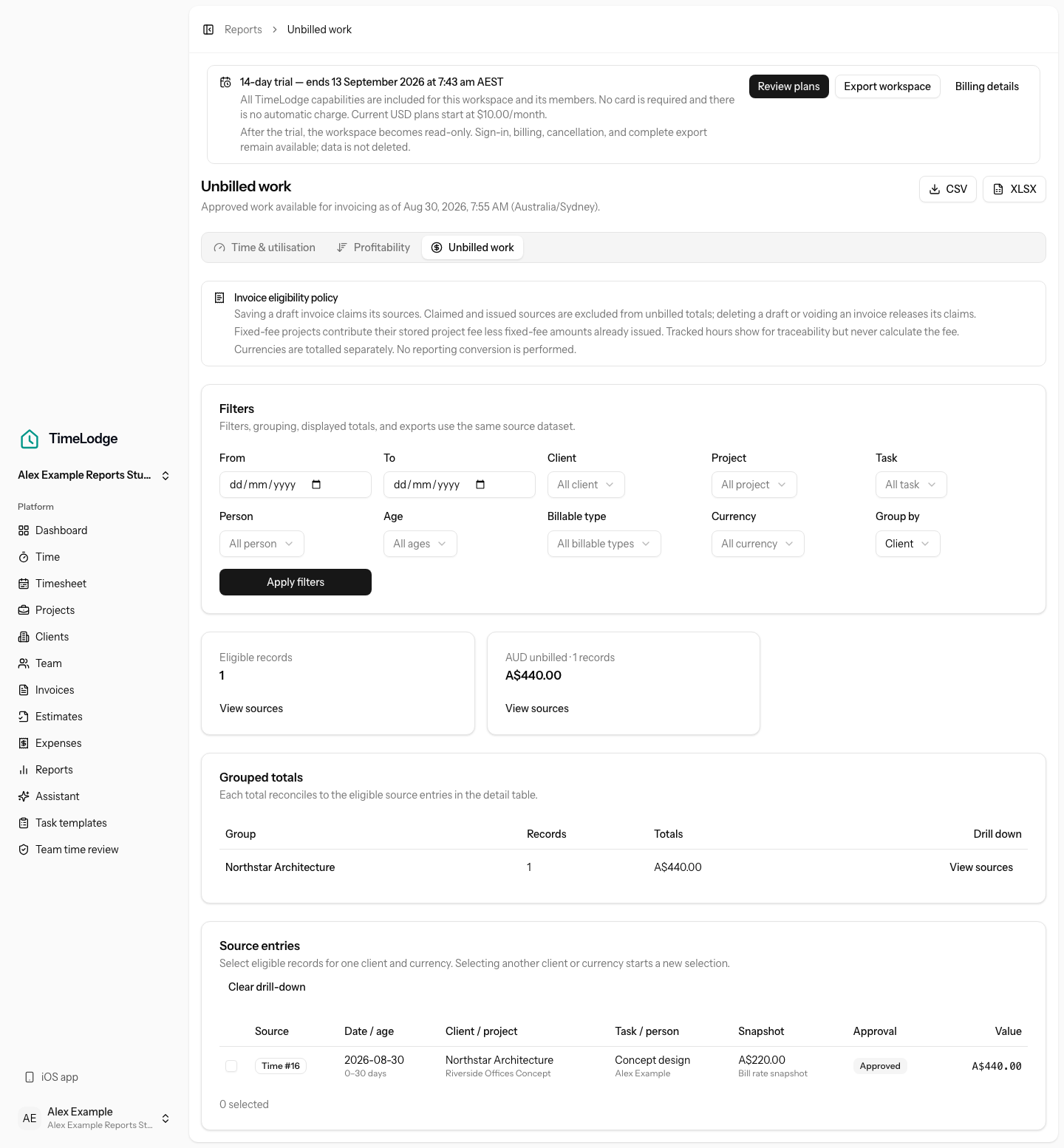
- Select Unbilled work under Reports.
- Set any date, client, project, task, person, Age, Billable type, Currency, and Group by filters, then select Apply filters.
- Compare Eligible records with each per-currency unbilled total.
- Select View sources to drill into a total; select Clear drill-down to restore every source.
- Select CSV or XLSX, then check the policies, eligibility reason, snapshot, amount, and per-currency total in the downloaded file.
Expected result: the sample shows one approved two-hour source, a saved A$220 bill-rate snapshot, and A$440 eligible unbilled value. The issued three-hour source is absent because it is already claimed by INV-1.
Reconcile a project budget

- Open Projects, find the project, open its actions, and select View.
- Compare Commercial health with Contributing work, Invoices, and Payments.
- Compare Hours budget and Fee budget with Pending, Approved, and Invoiced rows.
- Select By task or By person under Breakdown.
- Treat Forecast values as estimates, then check any missing-rate, mixed-currency, stale-work, or outside-date warning before acting.
Expected result: the sample reconciles 6.50 hours to 3.00 paid/invoiced, 2.00 approved, and 1.50 unsubmitted hours. It shows A$660 invoiced, A$440 unbilled, no outstanding balance, and 32.5% of the 20-hour budget used.
Search activity history
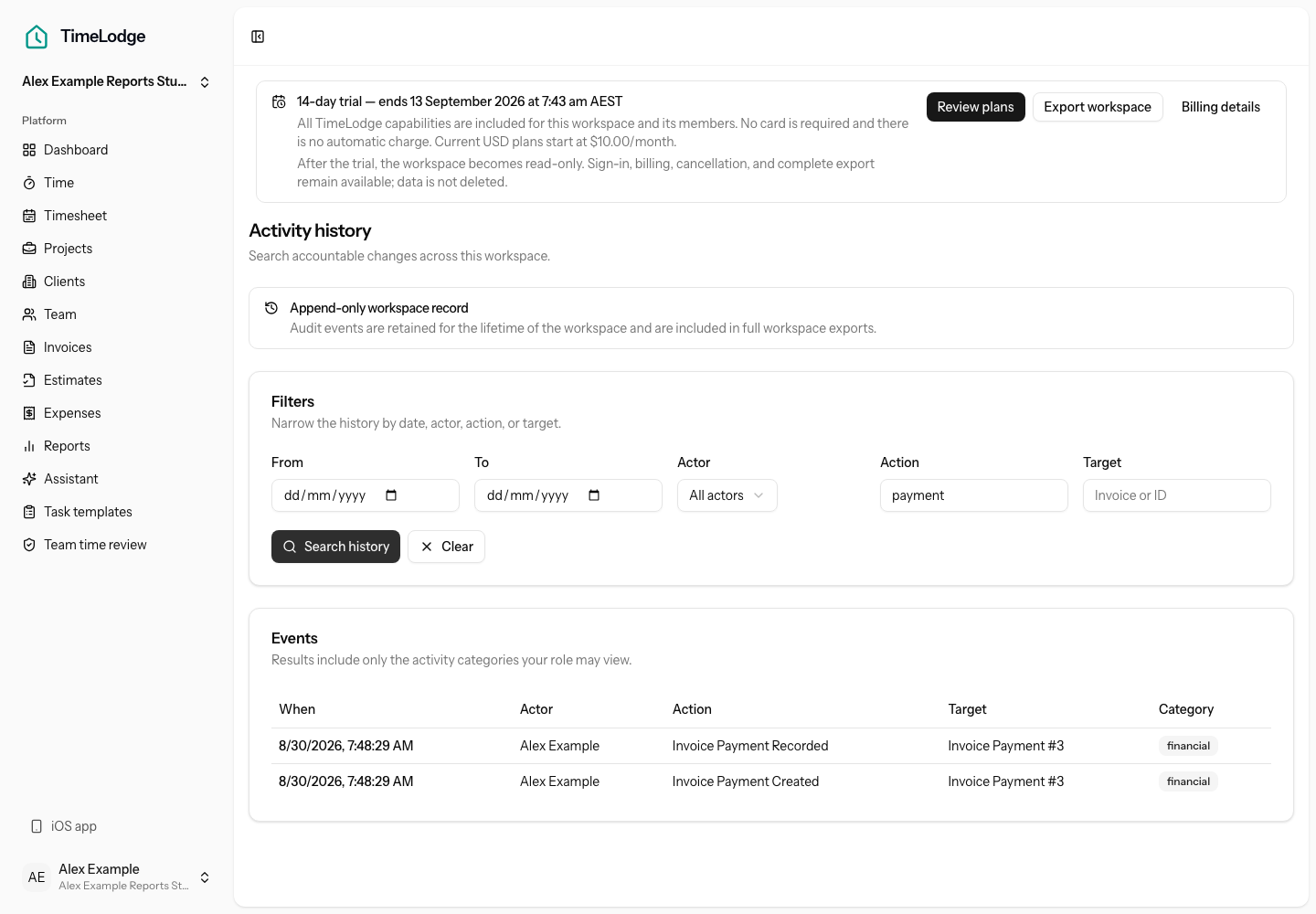
- Open your account menu and select Activity history.
- Set From, To, Actor, Action, or Target, then select Search history.
- Select a value under When to open the event identity and safe context.
- Select Activity history to return, or select Clear to remove filters.
Expected result: entering payment under Action shows the two fictional Invoice Payment Recorded and Invoice Payment Created financial events. Activity remains append-only for the lifetime of the workspace and is included in full workspace exports.
Empty states
- No time for the selected filters and No time entries match the selected filters mean the range or another time filter returned no entries.
- No invoice payments match the selected filters affects only payment activity, not tracked-time totals.
- No recognised work matches the selected filters means no approved or invoiced records qualify for Profitability.
- No matching work means Unbilled work found no eligible source after filters and invoice claims.
- No commercial actuals yet and No tracked time yet for this project mean the project has no completed contributing sources.
- No activity found means the event filters and your role's category visibility returned no events.
Expected result
You can reproduce a report from inclusive workspace-local dates, explain why its totals differ from issued invoices or payments, identify missing-rate and currency boundaries, drill to contributing records, and verify the matching export without exposing private costs to an unauthorised role.
Troubleshooting
- Today's work is missing: Check To. It should default to the current workspace day; select that date and Apply filters if you opened an older shared URL.
- Profitability is lower than Time & utilisation: Check approval state. Profitability uses approved or invoiced work, while Time & utilisation can include running and unsubmitted entries.
- Gross profit differs between Profitability and Project Budget: Profitability uses its operational revenue basis; Project Budget uses attributed issued invoice value for its commercial gross profit.
- Profit or margin is —: Look for Missing cost rates. Add the correct rate for future work; do not assume the missing cost was zero.
- Unbilled work is missing: Check approval, billability, bill-rate snapshot, date, and whether a draft or issued invoice claimed the source.
- Amounts use more than one currency: Read each currency section separately. No report performs a live exchange-rate conversion.
- A report, private cost, invoice action, or event category is absent: Check your role and project assignment with an Owner or Admin.
- A downloaded file does not match: Reapply the visible filters, download again, and check the file before sharing it. Treat exports as workspace data.
Related guides
- Track and manage your time
- Manage your team and timesheet approvals
- Record expenses and receipts
- Invoice your work and record a payment
- Set up a project
Next, open Reports, set the smallest useful date range, and reconcile a total to its contributing records before sharing an export.